Modern PC games look better than ever, but their hardware requirements have also become harder to meet. A new graphics card, more RAM, and a larger SSD can turn a budget gaming setup into an expensive project. For people using an older laptop or office PC, many recent games simply will not run properly.
That is where cloud gaming in 2026 becomes useful. Instead of making your computer render the game, cloud gaming runs it on a powerful remote server and streams the result to your screen. Services such as Xbox Cloud Gaming already let players access supported games through PCs, phones, tablets, consoles, selected televisions, and other compatible devices.
This means a low-end laptop may be able to play a demanding game that it could never run locally. However, cloud gaming is not a perfect replacement for a gaming PC. It depends heavily on internet stability, server distance, subscription costs, and regional availability.
For low-end users with a reliable connection, it can be one of the cheapest ways to access modern games. For users with unstable Wi-Fi or strict data limits, the experience can quickly become frustrating.
What Is Cloud Gaming?
Cloud gaming is a method of playing games that are running on remote computers rather than on your own device.
The word “cloud” refers to servers and software accessed through the internet instead of hardware located in your home. Microsoft provides a broader explanation in its cloud computing overview, describing cloud computing as the delivery of resources such as servers, storage, networking, and software through the internet.
In a cloud gaming setup, the service provider maintains powerful gaming servers inside data centres. When you start a game, one of those servers handles:
- Graphics rendering
- Game physics
- Artificial intelligence
- Storage
- Updates
- Frame generation
- Most game-processing tasks
Your computer mainly handles:
- Displaying the video stream
- Playing audio
- Sending keyboard, mouse, or controller input
- Running the cloud gaming app or browser
- Maintaining the internet connection
The experience is similar to streaming a film, but cloud gaming is interactive. Every button press must travel to the server, affect the game, and return to you as a new video frame.
How Does Cloud Gaming Work?
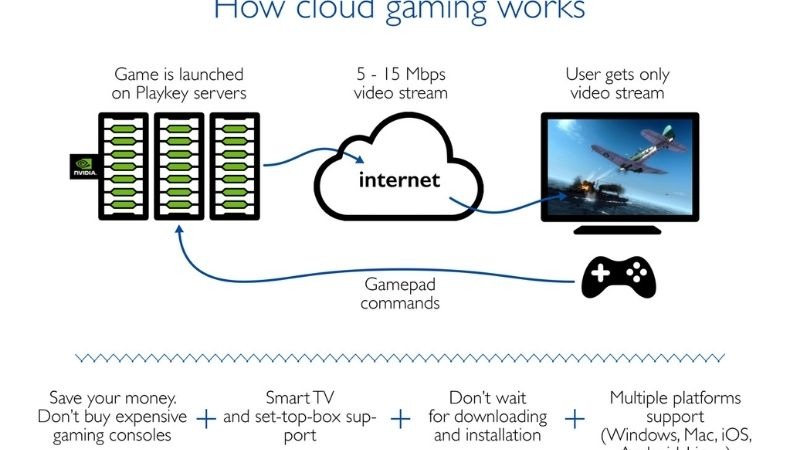
The process appears simple from the player’s side:
- You open a supported browser or cloud gaming application.
- You sign in and select a game.
- The service starts the game on a remote server.
- The server streams live video and audio to your device.
- Your controls are sent back to the server.
- The server processes your action and streams the result.
This cycle happens continuously while you play.
The most important technical factor is latency, which means the time required for data to travel between two points. Cloudflare’s latency explanation describes it as the time data takes to move from one location on a network to another.
When latency is low, controls can feel responsive. When it is high, you may press a button and notice a delay before the character moves.
Cloud gaming quality depends on more than download speed. It is also affected by:
- Server distance
- Packet loss
- Wi-Fi interference
- Network congestion
- Upload stability
- Video-decoding support
- Streaming resolution
- Other people using the same connection
A 100 Mbps connection with unstable latency may perform worse than a steady 30 Mbps connection.
Suggested Image Placement 1
Placement: After “How Does Cloud Gaming Work?”
- Image idea: A clean diagram showing a low-end laptop sending controller input to a cloud data centre, with rendered gameplay streaming back to the laptop.
- Filename: how-cloud-gaming-works-2026.jpg
- Alt text: Diagram explaining how cloud gaming works on a low-end PC
Popular Cloud Gaming Services in 2026
Cloud gaming platforms do not all use the same business model. Some let you stream supported games you already own, while others provide access through a subscription catalogue.
NVIDIA GeForce NOW
GeForce NOW is designed mainly for players who already own PC games through supported stores.
It connects with compatible titles from services such as Steam, Epic Games Store, Xbox, Ubisoft Connect, and Battle.net. Not every game in your library will necessarily be supported, because publishers decide whether their titles can appear on the platform.
The official GeForce NOW platform page describes the service as a way to stream supported PC games using remote GeForce hardware. Its available plans, session rules, prices, and performance levels may vary by region.
GeForce NOW is a strong option for users who:
- Already own many PC games
- Want stronger graphics without a GPU upgrade
- Use several PC game stores
- Prefer keyboard and mouse support
- Want to keep purchasing games through normal PC storefronts
NVIDIA’s official system requirements state that GeForce NOW needs at least 15 Mbps for 720p at 60 FPS and 25 Mbps for 1080p at 60 FPS. NVIDIA requires network latency below 80 milliseconds and recommends less than 40 milliseconds for a better experience.
Xbox Cloud Gaming
Xbox Cloud Gaming is more closely connected to the Xbox and Game Pass ecosystem.
It lets eligible users stream supported games without installing them locally. The service works through compatible browsers, apps, consoles, mobile devices, selected televisions, and other supported hardware.
Xbox Cloud Gaming is useful for players who:
- Want access to a subscription catalogue
- Do not already own a large PC game library
- Prefer controller-based gaming
- Use several types of devices
- Want an easy way to try different games
The game catalogue can change over time. A title available through a subscription today may leave later, so cloud access should not be treated as permanent ownership.
Amazon Luna

Amazon Luna is another cloud gaming service that allows users to play a rotating selection of games on supported devices without downloading the full titles.
Amazon describes Luna as a gaming service that works on devices users already own, with no console or lengthy game downloads required. Available games, memberships, and features depend on the user’s region and account.
Luna may appeal to:
- Amazon Prime users
- Casual players
- Families interested in party games
- People who use Fire TV devices
- Users who want a simple game-streaming setup
Regional support is important. Users should confirm that Luna and its desired games are officially available in their country before purchasing a controller or subscription.
GeForce NOW vs Xbox Cloud Gaming vs Amazon Luna
| Feature | GeForce NOW | Xbox Cloud Gaming | Amazon Luna |
| Main model | Stream supported PC games | Subscription-focused catalogue | Rotating library and Amazon access |
| Existing game ownership | Often required | Usually not required for catalogue titles | Depends on the game or plan |
| Best for | Existing PC game libraries | Game Pass users | Casual Amazon users |
| Keyboard and mouse | Available for many games | Depends on the title | Depends on the title |
| Controller support | Broad | Strong controller focus | Broad |
| Local downloads | Not usually required | Not required for streaming | Not required |
| Main limitation | Not every owned game is supported | Catalogue changes over time | Limited regional availability |
There is no universal winner. The right service depends on the games you want, the stores you already use, your preferred controls, and the quality of nearby servers.
Suggested Image Placement 2
Placement: After the platform-comparison table
- Image idea: Three generic cloud gaming panels representing a PC-library service, subscription gaming service, and casual streaming service, without copying official interfaces.
- Filename: cloud-gaming-platforms-comparison-2026.jpg
- Alt text: Comparison of popular cloud gaming services for low-end users in 2026
Benefits of Cloud Gaming for Low-End PC Users
The main advantage is simple: cloud gaming reduces the need for powerful local hardware.
You Do Not Need a Strong Graphics Card
The remote server renders the game. Your own computer does not need to calculate demanding lighting, high-resolution shadows, complex physics, or detailed textures.
This can make modern games accessible on:
- Budget laptops
- Older office desktops
- Mini PCs
- Chromebooks
- Devices using integrated graphics
- Computers with limited upgrade options
Your device still needs enough power to decode the video stream smoothly, but that requirement is far lower than rendering the full game locally.
Games Do Not Need Large Local Installations
Many modern games require more than 100GB of storage. Older laptops may have small SSDs or slow mechanical drives.
Cloud gaming keeps the main installation on the provider’s server. You can often begin playing without downloading the entire game or waiting for a major update.
Less Heat and Fan Noise
Running a demanding game locally places heavy pressure on the CPU and GPU. Cloud gaming moves most of that workload to a remote server.
The computer still handles video decoding and networking, but it will usually produce less heat than it would while rendering the same game locally.
Access From Different Devices
Some services allow players to continue across PCs, phones, tablets, televisions, handhelds, and consoles. Cloud saves can make switching between compatible devices easier.
It Can Delay an Expensive Upgrade
Cloud gaming may help you continue using an older computer while saving for better hardware. Paying for several months of access may be more manageable than immediately purchasing a graphics card, power supply, processor, and additional RAM.
However, subscription fees can become expensive over several years. Cloud gaming is not automatically the cheapest long-term solution.
Limitations of Cloud Gaming
Cloud gaming solves some hardware problems, but it introduces new limitations.
It Depends Completely on the Internet
A locally installed single-player game may continue working when your internet connection fails. A cloud-streamed game usually cannot.
Short interruptions can cause:
- Frozen video
- Reduced image quality
- Delayed controls
- Sound problems
- Disconnections
- Lost progress since the last save
Players with unreliable internet should test the service before paying for a long-term plan.
Input Delay Cannot Be Removed Completely
Your control input must travel to the cloud server, and the resulting video must travel back.
This delay may be acceptable in:
- Turn-based games
- Farming games
- Strategy games
- Adventure games
- Slower role-playing games
It can be more noticeable in:
- Competitive shooters
- Fighting games
- Rhythm games
- Racing simulations
- Fast platformers
A nearby server and low-latency connection can reduce the delay, but cloud gaming will normally add more network-related latency than playing locally.
Video Compression Reduces Image Quality
Cloud gaming streams compressed video. Even when the service displays a 1080p or 4K label, the image may not look as clean as a locally rendered game at the same resolution.
Compression can become visible in:
- Dark scenes
- Grass and vegetation
- Smoke
- Fog
- Rain and snow
- Rapid camera movement
- Detailed textures
Higher streaming quality generally uses more bandwidth and data.
Subscription Costs Add Up
A user may need to pay for:
- The cloud gaming membership
- A separate game purchase
- A Game Pass or publisher subscription
- Faster internet
- Additional data
- A compatible controller
Compare the complete cost rather than looking only at the advertised monthly fee.
Game Availability Is Limited
Not every PC or console game supports cloud streaming. Publishers can restrict their titles, and game catalogues can change.
Before subscribing, search the platform’s current library for the specific games you want to play.
Queues and Session Rules May Apply
Depending on the service and plan, users may encounter:
- Waiting queues
- Session-length restrictions
- Lower server priority
- Reduced streaming quality
- Advertisements
- Monthly play limits
These conditions can change, so check the official membership details before paying.
Cloud Gaming vs Local Gaming Performance
| Area | Cloud gaming | Local gaming |
| Required PC hardware | Low to moderate | Depends on the game |
| Internet connection | Always required | Mainly required for online play |
| Input latency | Usually higher | Usually lower |
| Image quality | Compressed video | Native rendered image |
| Local storage | Minimal | Can be substantial |
| Game downloads | Usually unnecessary | Required |
| Offline play | Generally unavailable | Often possible |
| Mod support | Limited | Usually better |
| Local heat | Lower | Higher during demanding games |
| Performance consistency | Depends on internet and servers | Depends on local hardware |
| Ownership | Depends on platform model | Stronger when purchased directly |
Local gaming remains better for low latency, image clarity, offline access, and modifications.
However, that comparison changes when the local PC cannot run the game. For many low-end users, the real decision is not between excellent local performance and cloud performance. It is between cloud streaming and not playing the game at all.
What Internet Speed Do You Need for Cloud Gaming?
A fast connection helps, but stability is more important than the highest advertised download number.
A practical starting point is:
- 15–20 Mbps: Basic 720p or lower-bitrate streaming
- 25–50 Mbps: More comfortable 1080p streaming
- 50 Mbps or more: Helpful for higher quality or shared households
- Latency below 40 ms: Preferable
- Minimal packet loss: Essential
- Consistent upload performance: Important for controls
These are general targets. Every service may publish different requirements.
Ethernet Is Usually Better Than Wi-Fi
A wired Ethernet connection avoids many problems caused by walls, wireless interference, distance, and congested Wi-Fi channels.
When Ethernet is unavailable:
- Use a 5 GHz or 6 GHz network.
- Stay close to the router.
- Stop large downloads.
- Pause cloud backups.
- Avoid weak signal areas.
- Restart the router when necessary.
- Limit heavy streaming on other devices.
Check Your Data Limit
Cloud gaming can use several gigabytes of data per hour. Exact usage depends on resolution, frame rate, bitrate, and service.
It may not be suitable when your internet plan has:
- A low monthly data allowance
- Expensive extra charges
- Speed reduction after a usage limit
- Strict fair-use rules
Suggested Image Placement 3
Placement: After the internet-requirements section
- Image idea: A laptop connected to a router with Ethernet, alongside clear indicators for download speed, latency, packet loss, and Wi-Fi strength.
- Filename: cloud-gaming-internet-requirements-2026.jpg
- Alt text: Internet speed and latency requirements for cloud gaming in 2026
Is Cloud Gaming Good for 2GB RAM Users?
Cloud gaming can work on a 2GB RAM PC, but it is not an ideal setup.
The game itself runs remotely, yet the operating system, browser, graphics driver, networking services, and video decoder still use local memory.
A 2GB computer may experience:
- Slow browser performance
- Heavy virtual-memory use
- System freezes
- Video playback problems
- Delayed input
- Application crashes
To improve the chances of success:
- Use a 720p stream.
- Close all unnecessary applications.
- Keep only one browser tab open.
- Disable unused browser extensions.
- Use Ethernet.
- Keep free storage available for virtual memory.
- Test a free option before subscribing.
A very old PC may also lack suitable hardware video decoding. In that case, cloud gaming can still stutter even when the internet connection is fast.
Verdict for 2GB RAM: Technically possible on selected systems, but reliability may be poor.
Is Cloud Gaming Good for 4GB RAM Users?
A 4GB RAM PC is a much more practical starting point.
It usually provides enough memory for Windows, a supported browser or cloud gaming app, and the incoming video stream—provided unnecessary background programs are closed.
For better results:
- Use 720p or 1080p streaming.
- Close heavy browser tabs.
- Connect the laptop charger.
- Select a performance-focused power mode.
- Update graphics and network drivers.
- Use Ethernet or stable 5 GHz Wi-Fi.
- Avoid recording or streaming gameplay at the same time.
The local graphics chip does not need to render the game, but it must decode the video stream correctly.
Verdict for 4GB RAM: Generally suitable when the internet connection and video-decoding hardware are good enough.
Pros and Cons of Cloud Gaming in 2026
Pros
- Runs demanding games on weaker hardware
- Reduces the need for an expensive GPU
- Uses little local storage
- Avoids large game downloads
- Produces less local heat
- Works across multiple device types
- Can delay a major PC upgrade
- Makes it easier to try different games
Cons
- Requires a continuous internet connection
- Adds input latency
- Can use large amounts of data
- Video compression affects image quality
- Subscriptions become expensive over time
- Games may be removed from catalogues
- Regional support remains limited
- Modding options are weak
- Queues and session limits may apply
- Offline play is generally unavailable
Final Verdict: Is Cloud Gaming Worth It in 2026?
Cloud gaming is worth considering for low-end users in 2026, especially when the local computer cannot run modern games.
It works best when:
- A supported service operates in your region.
- Your internet connection is stable.
- Latency to the service is low.
- The games you want are available.
- Your computer can decode the video stream smoothly.
For a 4GB laptop with integrated graphics, cloud gaming can provide access to games that would otherwise require a complete hardware upgrade. It is particularly useful for story-driven games, role-playing games, strategy titles, and casual gaming.
A 2GB PC may also work, but local memory and video decoding can become bottlenecks. Testing a free plan or limited trial is essential before paying.
Cloud gaming is less attractive for competitive players who need the lowest possible input delay. It is also unsuitable for people with unstable Wi-Fi, high packet loss, strict data caps, or no nearby server location.
The most practical approach is to combine cloud and local gaming. Run lightweight, competitive, and modded games directly on your PC. Use cloud gaming for demanding titles your hardware cannot handle.
That gives low-end users a sensible balance of cost, performance, access, and reliability.
Suggested Image Placement 4
Placement: Before the final verdict
- Image idea: A split-screen comparison showing a modern game streamed to an old laptop on one side and locally rendered on a gaming desktop on the other.
- Filename: cloud-gaming-vs-local-gaming-2026.jpg
- Alt text: Cloud gaming compared with local gaming for low-end PC users